

Google Trends is a free tool from Google that transforms searches into graphs to show how interest in a word or topic evolves in Google Trends, with filters by country and time period that make it easy to compare peaks and regional patterns. Using a scale of 0 to 100, Google Trends shows the relative interest in each search term across different time periods and regions. This information helps businesses and content creators identify emerging topics and plan strategies. For example, Google Trends reveals the growth of the term “chatGPT” in recent months, helping specialists create relevant content.
Google Trends: What is Google Trends?
Google Trends is a free tool from Google that shows the popularity of search terms over time. With it, we can see how many times a word or phrase is searched in a given period in different regions. This information is presented in graphs where the horizontal axis represents time and the vertical axis represents the level of relative interest. The data is normalized on a scale of 0 to 100 (100 marks the peak of popularity), which means that Google Trends does not provide absolute volumes but rather the comparative interest across different points in time. In addition, the platform offers filters by location, time period, topic category, and search type (web, images, news, YouTube, etc.), allowing us to tailor the analysis to our needs.
Google Trends allows you to compare multiple terms within the same search query. It also includes sections for “Related Topics” and “Related Queries“, where related or rapidly growing words and phrases associated with your term appear. These sections are useful for discovering new content ideas or emerging keywords. In short, Google Trends offers up-to-date data on what users are searching for, helping you identify patterns, seasonality, and trending topics.
What is Google Trends used for?
The primary function of Google Trends is to detect public interest. Among its most important uses are:
- Discover new keywords. By analyzing “Related Queries,” you can find emerging terms or variations that incorporate your keyword. This enriches your SEO strategy with alternative keywords you might not have otherwise considered.
- Plan seasonal content. Google Trends reveals when interest in certain topics increases. For example, searches for “Christmas” spike every December, while other queries like “Black Friday” tend to rise in November. With this data, you’ll know which months make the most sense to publish articles or run campaigns, allowing you to plan your editorial calendar in advance.
- Analyze the competition. You can compare the search volume for your brand, product, or keyword with that of your competitors. If both have sufficient search volume, they will appear on the same graph, allowing you to identify who is capturing more attention. This is also useful for measuring the impact of a campaign or event against other players in the industry.
Geographic segmentation: Google Trends offers a color-coded map showing where a selected term is most popular. Darker areas represent a higher percentage of searches for that term. For example, a map of Spain might highlight the regions where “digital marketing” or any other topic is most frequently searched. This information is key for targeting local campaigns or advertising in areas with the highest demand. This allows you to focus on specific regional audiences (local SEO, geo-targeted ads, etc.).
Furthermore, Google Trends doesn’t just cover web searches. It allows you to change the data source to Google Images, Google News, Google Shopping, and even YouTube. This way, you can explore trends across different channels and formats depending on your target audience.
How to use Google Trends?
To start using Google Trends, follow these practical steps:
1. Open the Google Trends website
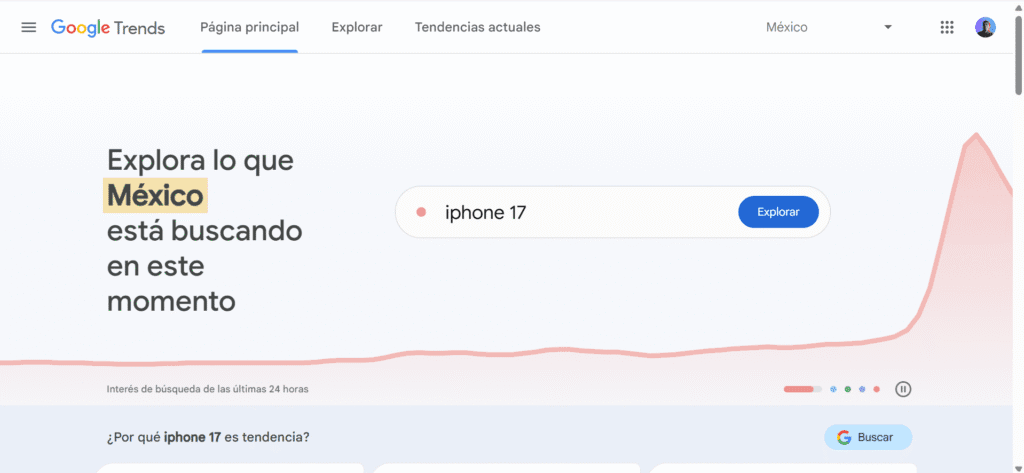
To begin, simply open the Google Trends website at trends.google.com. From there you can directly explore the latest trends or search for a specific topic.
2. Enter the keyword or topic
Type the word or phrase you want to research into the search bar and press Enter. You can use broad or specific terms; the key is to start with a seed that you will then expand with the related queries that the tool shows.
3. Apply filters: country, period, and category
Adjust the filters to refine the results: select country or region, time interval (day, 90 days, 12 months or custom range) and subject category; also choose the type of search (Web, Images, News, Shopping or YouTube) so that the data reflects the exact behavior you are interested in analyzing.
4. Analyze the results (graph and heat map)
Observe the main chart to identify peaks, sustained trends, and dips; interpret relative values (0–100) by the shape of the curve rather than by absolute numbers. Review the heat map to identify regions of greatest interest and use the “Related Topics” and “Related Queries” sections for content ideas and long-tail keywords.
5. Compare terms
Click on “+ Compare” to add up to four terms and view them together in the same graph; this comparison helps you decide between synonyms, prioritize keywords, and evaluate relative performance against competitors or variations of your topic.
Practical examples
Imagine you run a tech blog and want to gauge interest in artificial intelligence tools. If you search for “ChatGPT” on Google Trends, you’ll see a graph showing sharp spikes in searches coinciding with relevant news or updates. In fact, in 2024, Google Trends recorded “ChatGPT” as one of the most searched topics. This indicates when the public is most engaged with the subject. You could compare “ChatGPT” with “Google Bard” or other AI by adding both terms to Trends; the resulting graph would show you which one generates more interest at different times. With this data, you would know when to publish articles about AI (for example, right after a major announcement) to capitalize on the surge in searches.
You can also use Google Trends to plan seasonal content. For example, searches for “Christmas” spike every December. With that information, it’s wise to prepare holiday content (gift ideas, decorations, recipes, etc.) several months before the peak of interest. This way you ensure that your site is already well positioned when users start searching for information on the topic.
Better alternatives to Google Trends
The best overall alternative to Google Trends is Semrush, a SaaS platform for online visibility and content marketing. Other tools that complement its reach include Ahrefs and SimilarWeb, along with Google News (for real-time news updates), Exploding Topics (for detecting emerging trends), and Pinterest Trends (for tracking growing visual searches). Together, these solutions provide what Google Trends doesn’t directly offer: estimated search volumes, competitive metrics, web traffic, news context, and early warnings of new topics. We briefly describe each of them below.
Semrush
Semrush is useful when you need to move from simply being curious about a trend to developing a marketing strategy with clear priorities. Its keyword research provides estimates of volume, difficulty, and semantic variations to help you decide which terms deserve content or advertising investment. Where Google Trends offers a relative index, Semrush adds magnitude, competition, and commercial value, helping you schedule posts and measure real opportunities.
Ahrefs
Ahrefs combines keyword research with in-depth analysis of backlinks and pages that are already ranking. This allows you to see how a trend translates into organic visibility: you identify content gaps, understand why certain results dominate the SERP, and estimate the effort needed to compete. It’s a great complement to Trends when you’re looking to validate demand and, at the same time, define the SEO strategy to capture it.
Google News
Google News functions as a near real-time news radar. It doesn’t provide search volumes, but it does tell you what’s being discussed today and which stories are gaining traction in the media. Cross-referencing these news peaks with Google Trends helps anticipate surges in search interest and react quickly with articles, briefs, or updates that capitalize on the current conversation.
Exploding Topics
Exploding Topics looks ahead: it identifies concepts that are starting to grow before they become obvious. It’s useful for discovering emerging categories, products, or terms and building content or business proposals when competition is still low. Used in conjunction with Google Trends, it allows you to cover both early detection and tracking of the interest curve as the topic matures.
Pinterest Trends
Pinterest Trends reflects which ideas and products are gaining traction in a visual environment where the intent is often geared towards inspiration and purchasing. It’s especially valuable for sectors like fashion, home, beauty, recipes, and DIY, because it reveals seasonality, creative peaks, and preferences by country or category. Combining it with Google Trends provides a comprehensive overview that integrates general search with visual signals of demand.
By combining these tools with Google Trends, you go from “knowing that something is trending” to “understanding its value, how to compete, and when to act”: detect signals with Exploding Topics, validate interest with Trends, estimate potential with SEMrush or Ahrefs, and refine your creative approach with Pinterest Trends; this chain helps you decide with data what to publish, where, and when.
Google Trends in México
Google Trends has local versions (e.g., trends.google.com.mx). In Mexico, trending topics may differ: for example, the search terms “LINEA 3 Trolebús CDMX” or “Easter Week vacations” show their own peaks. The “Trending in your region” feature lets you see what’s popular in your area. Google even collaborated with journalists in Mexico to use Trends in election reports. This demonstrates its value as a public information tool.
Frequently Asked Questions about Google Search Trends
What is trending?
The term “trending” literally means “in trend” and is used to describe topics, searches, or content that are gaining significant popularity in a short period. For example, on social media platforms like Twitter, a Trending Topic is a keyword or hashtag that is mentioned massively at a given time. Generally, when we talk about trending, we are referring to what is being discussed or searched for most recently. In Google Trends, a “trending” term is one whose search frequency is increasing significantly compared to the past.
How to do keyword research with Google Trends?
Google Trends offers several features for discovering relevant keywords:
- Explore terms: In the Explore tool, enter up to five search queries (you can use the + Compare button to add more terms). This generates a graph of interest over time for each term, allowing you to see which ones have the highest volume or are growing. Adjust location, period, and category to segment by country and date.
- Graph analysis: Observe whether searches rise or fall over time. Sustained growth indicates increasing interest, while a decline may signal that the topic is no longer popular.
- Related Topics and Queries: Further down the page, you’ll find the “Related Topics” and “Related Queries” sections. Switch the filter to “Most Popular” to see established keywords, or to “Up-and-Coming” to see queries that have recently seen significant growth. This provides insights into new keywords users are using. For example, in that list, terms labeled “Breakout” represent searches with a sudden surge (over 5000%), which may indicate emerging opportunities.
What’s trending now?
To find out what’s trending right now, you can use the Current Trends section of Google Trends. It displays the searches that have recently increased in popularity. For example, the “Trending Now” window highlights terms with a rapid increase in interest over the last 10 hours, 24 hours, or 7 days. Google indicates that you can explore trending searches for more than 100 countries on this page, with data updated every 10 minutes. Once you’re there, select your country and adjust the time range (for example, the last 4 or 24 hours) and category (e.g., sports, technology). You’ll then see a list of queries marked “active” if they are still growing or “ended” if they have returned to normal. In short, the most direct way to understand current trends is to check these Google Trends listings or their “Trending Searches” page for your region.
How to use Google Trends for SEO?
Google Trends is very useful for improving SEO because it allows you to align your content with what people are searching for. For example, you can:
- Detect emerging keywords: Search for your main term in Explore and review the related queries. There you’ll see which secondary keywords are trending or rapidly growing. You’ll see the growth percentage and labels like “Breakout” (growth >5000%). These clues point you to relevant content ideas.
- Analyze volume trends: The Interest over time graph shows whether a term is rising or falling in popularity. A peak in searches may signal the best time to publish or update content; a drop may suggest that the topic is a passing fad and should be treated with caution.
- Explore related topics: The “Related Topics” and “Related Queries” sections (filtered by “Most Popular” or “Trending”) expand your content strategy. Here you’ll find article ideas or frequently asked questions that your audience is searching for related to your topic.
- Local SEO: In the interest graph, you can select “Interest by Region”. This allows you to see if searches for your business or product are growing in specific geographic areas. If you have a local business, filter by your city or country to tailor content and keywords to the right market.
- Benchmarking with competitors: Adding your brand name and your competitors’ names to Explore shows you how their searches vary. This helps you identify your position relative to rivals and which of their terms also interest your audience, helping you optimize your SEO strategy.
What does “Breakout” mean in Google Trends?
In Google Trends, the “Breakout” label indicates a term whose search volume has skyrocketed. Technically, it applies to queries with a volume increase exceeding 5000% during the analyzed period. In practice, this often happens with words that previously had very low search volume, so Google can’t compare them with precise numerical data and instead displays “Breakout.” For example, a viral news story or a product launch can generate a “Breakout” term. If you see this label, it means that the term is very recent or relatively unknown and has just become a trending topic. These are opportunities to create fresh content, provided the topic is relevant to your audience.
Can I compare terms on Google Trends?
Yes. Google Trends lets you compare up to five terms at once. To do this, after searching for your first term, click + Compare and enter another term(s). You’ll then see overlay graphs showing the relative popularity of each term over time. This helps you identify which term is most popular overall or in a specific region. For example, you can compare brand names, product names, or keyword variations to decide where to focus your efforts. It’s also useful for competitive analysis: by adding your brand name and those of your competitors, you can see which one generates more searches and what related terms are common between them.