What is a 404 error?: How it affects SEO and how to fix it
AuthorEdwin Ruiz
Published
What is error 404?
A 404 error is an HTTP status code that indicates the server cannot locate the requested page or resource at a specific URL. This occurs when a link points to a page that has been deleted, moved, or renamed. It is a common problem that, if not addressed properly, can negatively impact both user experience and the SEO performance of a website.
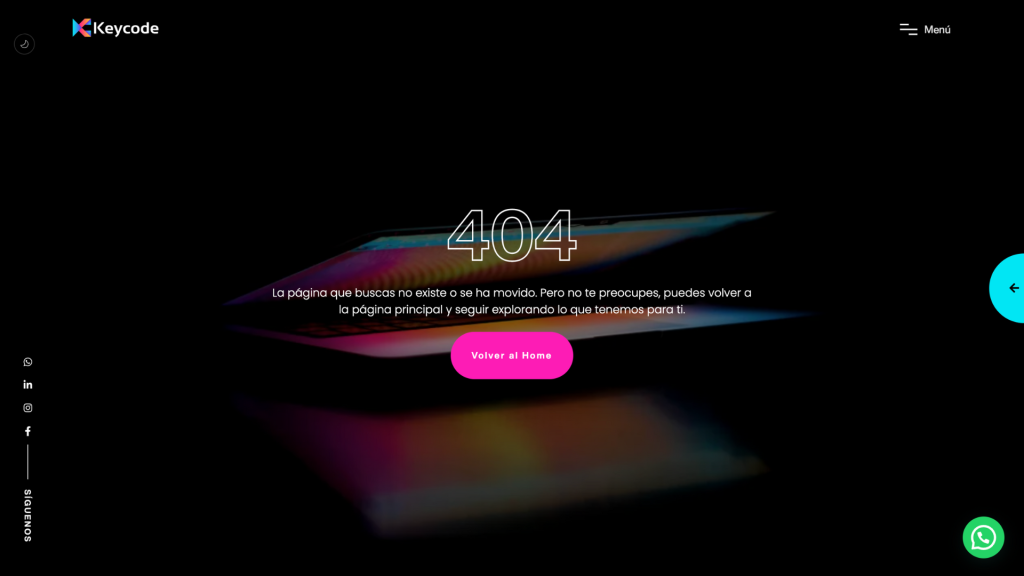
Although the design and content may differ, most 404 error pages include the following common elements:
Main Message: Clear and direct phrases such as “404 Not Found,” “Page not found,” or “Sorry, this page is unavailable” are generally used. This message is key for the user to understand that an error occurred.
Problem Description: A brief explanation is usually added to inform the user about the reason for the error, such as the requested URL not existing, misspelled, or no longer available.
Navigation Options: To improve the user experience, many custom 404 error pages include helpful links, such as a button to return to the homepage, a navigation menu, or a search bar that allows the visitor to explore other site content.
Visual Design and Branding: Modern sites often make 404 error pages an extension of their visual identity. This can include colors, typography, and branding styles, minimizing user frustration. In some cases, creative or humorous elements are used to soften the impact of the error, such as funny illustrations, puns, or interactive animations.
A well-designed 404 error page not only reduces user frustration, but can also be an opportunity to reinforce brand image and guide the visitor to other relevant content within the website.
HTTP Code Categories
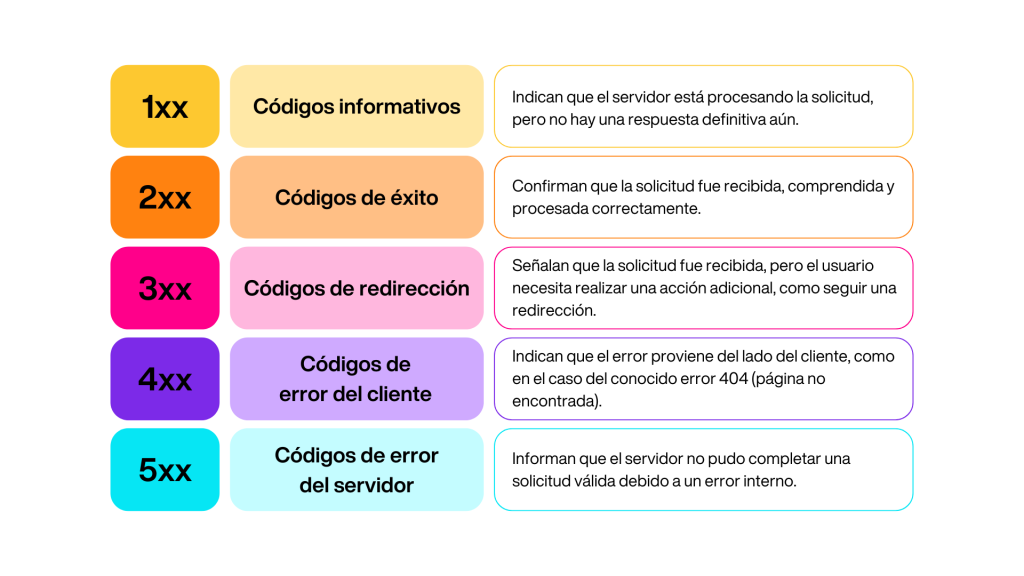
HTTP status codes, such as error 404, are part of a standardized system for communicating the status of requests between browsers and servers. These codes are organized into five main categories:
These codes not only help identify technical problems, but are also essential for optimizing the user experience and improving the overall performance of the website.
“Hard” and “Soft” 404 Errors
404 errors can be divided into two main categories: “hard” and “soft”, each with distinct implications for users, search engines, and a website’s SEO.
“Hard” 404 errors
A “hard” 404 error occurs when a page is not available at all and the server responds correctly with an HTTP status code 404.
Clear communication with search engines: This response tells both users and search engines that the page does not exist. This prevents search engines from wasting resources trying to crawl or index it.
Impact on search engines: When search engines detect “hard” 404 errors, they usually remove such pages from their indexes, preventing them from appearing in search results.
“Soft” 404 errors
A “soft” 404 error, on the other hand, occurs when a page appears to load correctly and returns a 200 status code, but the content shows that it is actually unavailable.
Status code issue: This occurs when the page displays an error message or a placeholder page without returning the appropriate HTTP 404 code.
Confusion for search engines: For example, a page labeled “Page not found” but containing little or no relevant content may be misinterpreted by search engines, which might treat it as a low-value page instead of excluding it from the index.
Impact on SEO
Both types of errors can negatively affect SEO:
“Hard” 404 errors: Although they are clearer to search engines, too many can indicate link management problems or outdated content.
“Soft” 404 errors: These are particularly problematic because search engines can misinterpret your intent and continue indexing pages that provide no value, diluting the website’s relevance.
To minimize the impact, it is crucial to regularly monitor 404 errors and ensure that non-existent pages correctly return HTTP 404 code, while implementing 301 redirects where necessary.
Impacts of 404 errors
404 errors can have a number of negative consequences for your website, especially if they appear on pages that should be accessible. Below, we explain the main impacts:
1. Bad user experience
404 errors directly impact the user experience by preventing visitors from accessing the content they want to see.
Imagine you are browsing Keycode’s services page and you click on a button that says “Read more”.
Instead of being directed to the expected information, you end up on a 404 error page.
User Options:
Spending more time searching for similar information, which is frustrating and less efficient.
Deciding not to continue the search, which leaves the user dissatisfied and with a negative perception of the site.
In both cases, the user experience is affected, decreasing trust in your brand and reducing the chances of the visitor returning to your site.
2. Search engines cannot rank your page
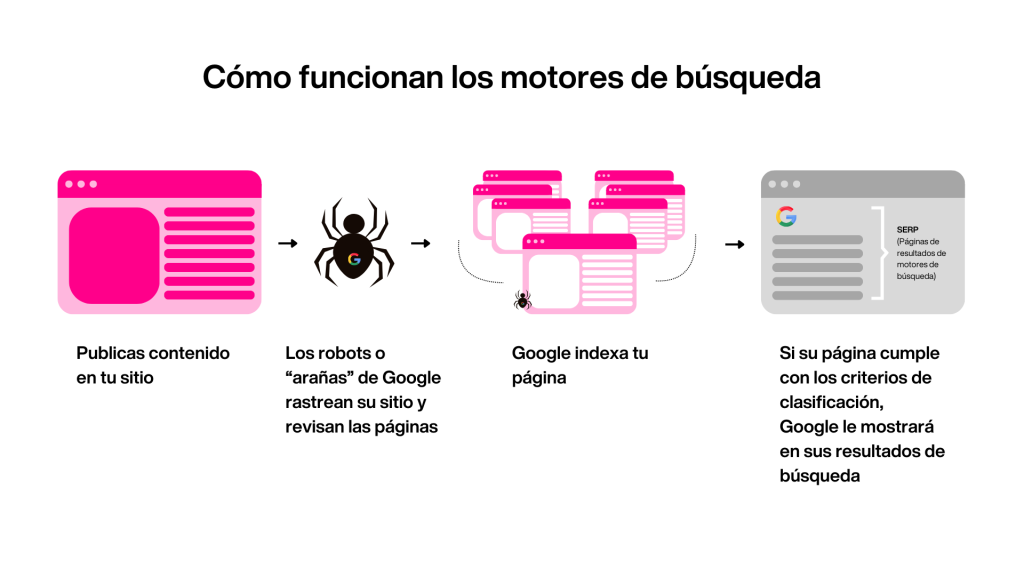
For a page to rank in search engine results pages (SERPs), it must first be indexed by search engines.
How a 404 error impacts:
If a search engine crawls a page and encounters a 404 error, it recognizes that the page does not exist and decides not to index it.
This means that the page will not be visible to users through searches, resulting in lost potential traffic opportunities.
3. Reduced SERP presence
Pages with 404 errors can negatively impact your website’s visibility in search results. Search engines don’t index pages with these errors, meaning fewer pages from your site will be available to appear in the SERPs.
Furthermore, links pointing to pages with 404 errors lose their value, reducing your domain authority. This can make your site appear less trustworthy to search engines, thus affecting its ranking.
As a result, reduced visibility of your site in the SERPs can translate into a drop in organic traffic, as fewer people will access your page through searches.
How to identify 404 errors on your website
You can find 404 errors on your website by manually checking each link to ensure it doesn’t lead to a “page not found” error page. However, this method can be very tedious and time-consuming. Furthermore, differentiating between “hard” and “soft” 404 errors can be tricky.
To facilitate this process, you can use the following tools and methods to scan your website for 404 errors on a large scale:
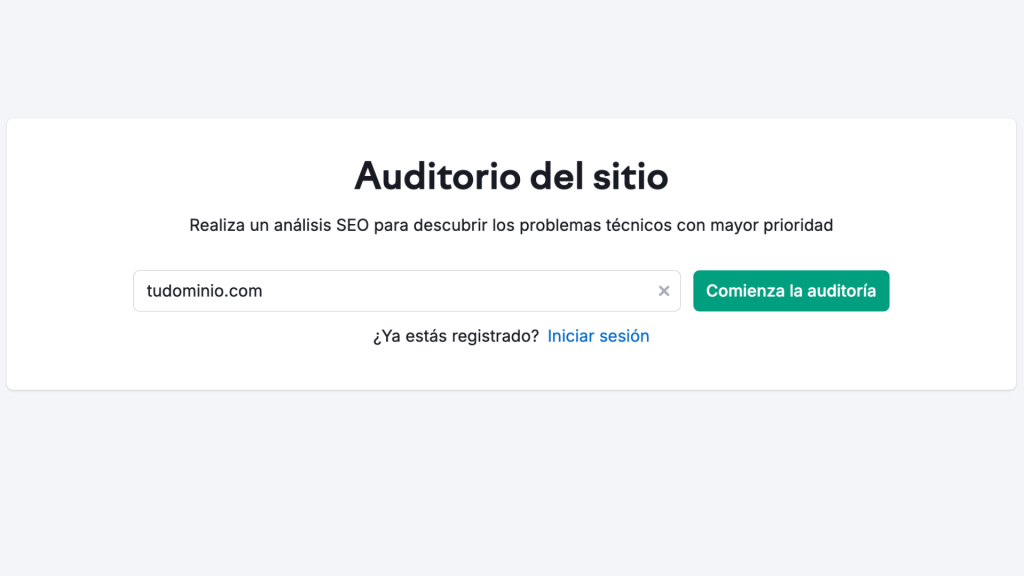
1. Use the Semrush site audit tool
Semrush’s website audit tool can identify over 140 technical issues on your website, including 404 errors. It also offers recommendations on how to fix these problems.
If 404 errors are found, the tool will display them in the “Errors” section of the report, along with a summary of the URLs that return the 4XX status code. From there, you can quickly identify and correct the URLs with 404 errors.
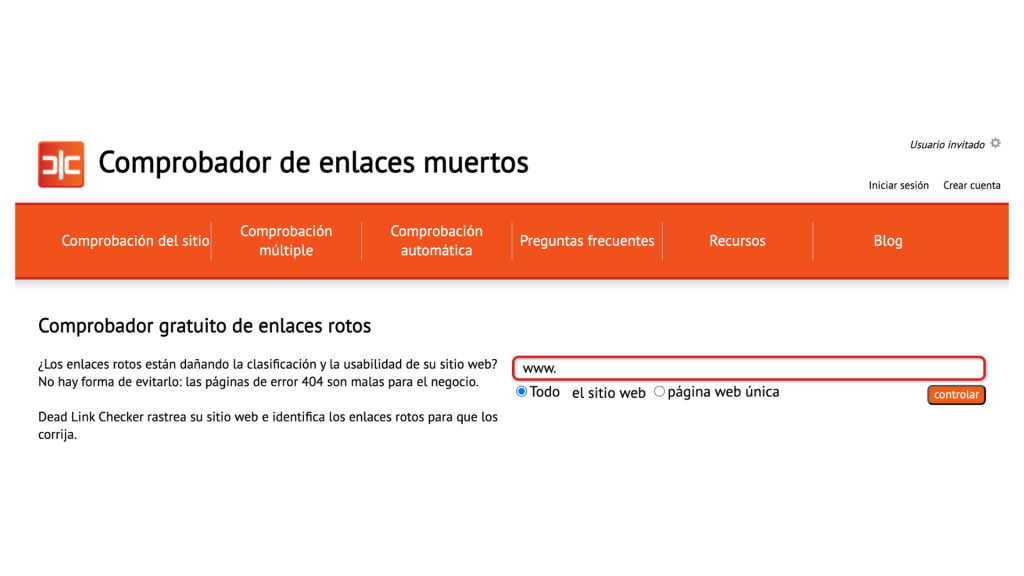
2.Use the dead link checking tool
Dead Link Checker is a tool that scans your website for broken or dead links, which are links that do not direct the user to the expected destination due to a 404 error.
The tool will show you the status of each broken URL, the text of the original link, and the URL that returned the 404 error. This way, you can quickly locate broken links and fix them.
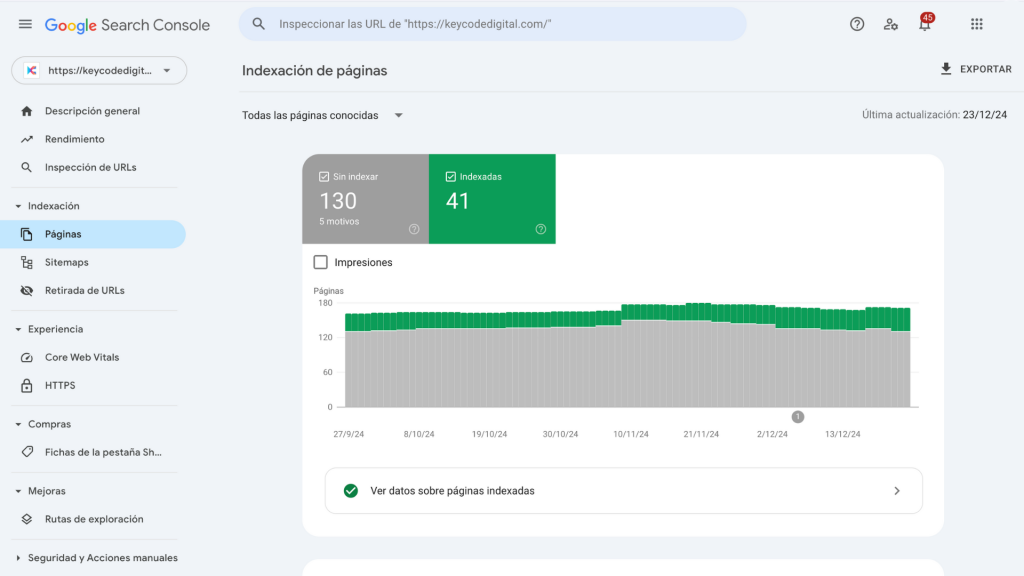
3.Check the Google Search Console
Google Search Console provides reports on your website’s performance in Google search results, including a page indexing report that shows URLs with “hard” and “soft” 404 errors.
If Google finds 404 errors on your site, it will display them in the Page Indexing Report under the rows “Not Found (404)” and “Soft 404”. These reports will allow you to see the specific URLs that are generating the 404 errors and help you fix them to improve user experience and your site’s search engine performance.
Do you need to fix the 404 errors on your website?
Not all 404 errors require immediate action. If you’ve removed pages from your website and don’t want users to access them, the associated URLs should return 404 errors, indicating to search engines not to index or rank that content.
Tip: To maintain a good user experience, remove links to these unwanted pages from your website. This will prevent users from trying to access them.
If you want to make certain pages that are currently showing 404 errors accessible or redirect traffic to them, then you need to fix it.
How to fix the 404 Not Found error on your website
Even if Google detects a “404 not found” error on a page, it will continue crawling, but less frequently and possibly stopping altogether.
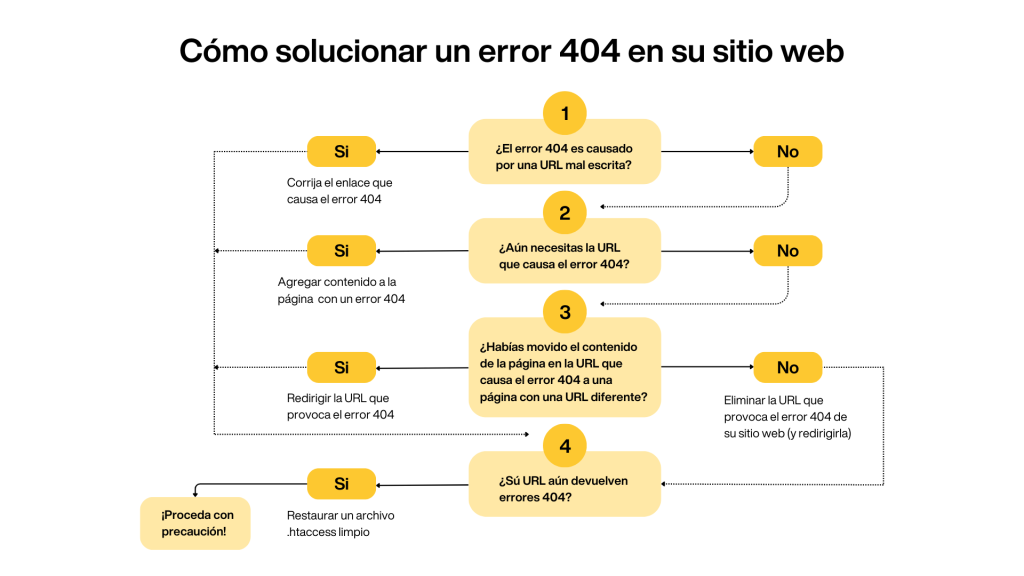
There are several methods to correct 404 errors before the next Google crawl:
Fix the link causing the 404 error If a link on your website leads to a 404 error page due to a typo, correct the link so it points to the correct page.
Redirect the URL causing the 404 error Set up a redirect so users are automatically directed to the correct page. This is useful if you moved a page’s content to a new URL. This will prevent users from reaching an error page.
Add content to the page with a 404 error If you want a URL that is currently returning a 404 error to be accessible, add content to that page.
Once the page has content, the 404 error will disappear because the server will be able to locate the resources at that URL.
Remove the URL causing the 404 error from your website (and redirect it) If you no longer need a URL that generates a 404 error, remove it from your site. This will prevent users from reaching that page. If necessary, set up a redirect so that users who reach that URL from bookmarks or external links are properly redirected.
Restore a clean .htaccess file If your .htaccess file is corrupted, this could cause 404 errors on your site. To fix this, replace the corrupted .htaccess file with a clean version. This is a technical process that may require the help of a developer if you are not familiar with editing this file.
Ready to optimize your website?
Don’t let 404 errors affect your users’ experience or your search engine ranking. At Keycode, we can help you identify and fix these problems to improve your website’s performance.